
In [2]:
from IPython.display import HTML

HTML(
    """
    <link rel="stylesheet" href="css/custom.css">
    <script src="js/custom.js" defer></script>
    """
)
Out[2]:
Notes
In [3]:
# from IPython.display import display, Image

# display(Image(filename="images/Flight Plan Hawaii.png"))
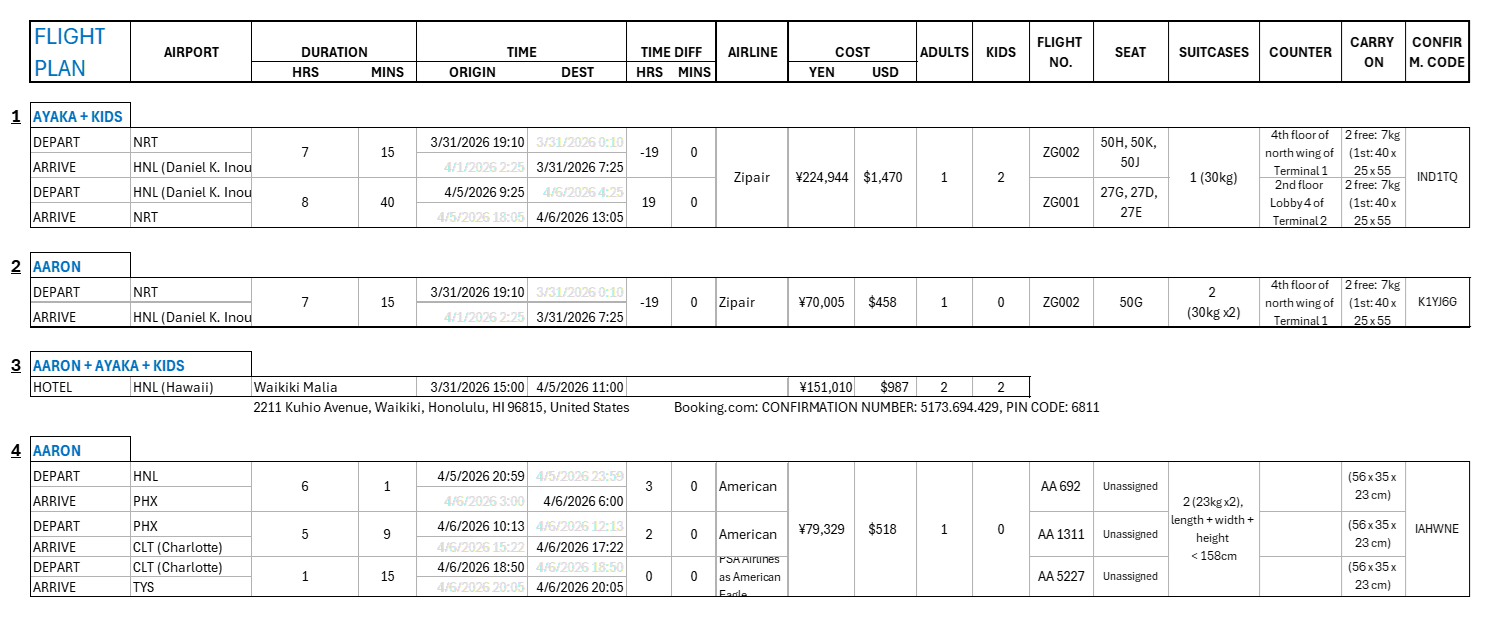
Hawaii Plan
- Family goes to Hawaii
- Ayaka and kids return to Japan
- Aaron continues to Knoxville
In [ ]:
from IPython.display import HTML

HTML(
    '<img id="flight-plan" src="images/Flight Plan Family Hawaii.png" id="flight-plan-img">'
)
Out[ ]:
In [5]:
# from IPython.display import display, Image

# display(Image(filename="images/Flight Plan San Jose.png"))
In [6]:
# from IPython.display import display, Image

# display(Image(filename="images/Flight Plan Seattle.png"))
In [7]:
# import pandas as pd
# import pyarrow as pa
# import pyarrow.parquet as pq
# from IPython.display import display, HTML
# import re

# flights = pq.read_table("../../Programming/Python/Flight Scanner/flight_prices.parquet")
# flights_df = pa.Table.to_pandas(flights)


# def get_flights_html_table(df):

#     def duration_to_minutes(s):
#         match = re.match(r"(?:(\d+) hr)?\s*(?:(\d+) min)?", s)
#         if not match:
#             return None
#         hours = int(match.group(1)) if match.group(1) else 0
#         minutes = int(match.group(2)) if match.group(2) else 0
#         return hours * 60 + minutes

#     flights_df["Duration (mins)"] = flights_df["Duration"].apply(duration_to_minutes)
#     flights_df.rename(columns={"download_date": "Download Date"}, inplace=True)
#     flights_df["Price"] = flights_df["Price"]

#     styled = (
#         flights_df.style.set_table_styles(
#             [
#                 {
#                     "selector": "th",
#                     "props": "background-color: #1f2937 !important; color: white; padding: 8px 12px;",
#                 },
#                 {"selector": "td", "props": "padding: 6px; border: 1px solid #e5e7eb;"},
#                 {
#                     "selector": "tr:nth-child(even)",
#                     "props": "background-color: #f3f4f6;",
#                 },
#             ]
#         )
#         .set_properties(**{"text-align": "center", "font-size": "13px"})
#         # .highlight_min(subset=["Price"], color="#d1fae5")
#         .background_gradient(subset=["Price"], cmap="Reds")
#         .background_gradient(subset=["Duration (mins)"], cmap="Reds")
#         .format({"Price": "${:,.0f}"})
#         .hide(axis="index")
#     )

#     return styled


# # print(flights_df.shape[0])

# # cols_to_check = [c for c in flights_df.columns if c not in ["Price", "Date"]]
# # df_clean = flights_df.drop_duplicates(subset=cols_to_check)
# flights_df = flights_df.sort_values(
#     ["Departure", "Arrival", "download_date"], ascending=[True, True, False]
# ).drop_duplicates(
#     subset=["Airline", "Stop", "Departure", "Arrival", "Duration", "Price"],
#     keep="first",
# )

# # dupes = flights_df[
# #     flights_df.duplicated(
# #         subset=["Airline", "Stop", "Departure", "Arrival", "Duration", "Price"],
# #         keep=False,
# #     )
# # ].sort_values(["Departure", "Arrival", "download_date"], ascending=[True, True, False])
# # print(dupes)


# # display(HTML(styled.to_html()))
# styled_df = get_flights_html_table(flights_df)
# html_table = styled_df.to_html(table_id="flights")
# # Replace the auto-generated table ID with your own
# html_table = re.sub(r'<table[^>]*id="T_[^"]+"', '<table id="flights"', html_table)

# html_with_filters = f"""
# <!DOCTYPE html>
# <html lang="en">
# <head>
#     <meta charset="UTF-8">
#     <meta name="viewport" content="width=device-width, initial-scale=1.0">
#     <title>Styled Pandas DataFrame with Filters</title>
#     <link rel="stylesheet" href="https://cdn.datatables.net/1.10.23/css/jquery.dataTables.min.css">
#     <style>
#     table {{
#         width: 100%;
#         border-collapse: collapse;
#         border: 1px solid #1f2937;
#         margin-top: 4px;
#     }}
#     table#flights.dataTable th {{
#         background-color: #1f2937;
#         color: white;
#         padding: 8px 16px !important;
#     }}
#     table#flights.dataTable td {{
#         padding: 6px !important;
#         border: 1px solid #e5e7eb;
#     }}
#     table#flights.dataTable tr:nth-child(even) {{
#         background-color: #f3f4f6;
#     }}
#     .dataTables_length:has(label) {{
#         margin: 12px 0 !important;
#     }}
#     #flights_length {{
#         margin: 12px 0 !important;
#     }}
#     #flights_filter:has(label) {{
#         margin: 0 0 4px 0 !important;
#     }}
#     .dataTables_filter {{
#         margin: 1rem !important;
#     }}
#     table.dataTable {{
#         margin: 4px 0 !important;
#     }}
#     </style>
# </head>
# <body>
#     <h2>Flights</h2>
#     {html_table}

#     <script src="https://code.jquery.com/jquery-3.6.0.min.js"></script>
#     <script src="https://cdn.datatables.net/1.10.23/js/jquery.dataTables.min.js"></script>
#     <script>
#         $(document).ready(function() {{
#             $('#flights').DataTable();
#         }});
#     </script>
# </body>
# </html>
# """

# # Save to a file
# with open("styled_dataframe_with_filters.html", "w") as f:
#     f.write(html_with_filters)
In [8]:
# from IPython.display import display, HTML, IFrame

# # display(HTML("styled_dataframe_with_filters.html"))

# # with open("styled_dataframe_with_filters.html") as f:
# #     display(HTML(f.read()))

# IFrame("styled_dataframe_with_filters.html", width="100%", height=1000)
In [9]:
# countries = ["", "Brazil", "Singpore", "Canada", "", "Chile"]
# # Remove empty values
# print(list(filter(None, countries)))
# print(list(filter( None, countries)))
# print(list(filter(lambda x: not x.startswith("S"), countries)))
In [10]:
# html_table = flights_df.to_html(table_id="flights")
# html_with_filters = f""" <!DOCTYPE html> <html> <head> <link rel="stylesheet" href="https://cdn.datatables.net/1.10.23/css/jquery.dataTables.min.css"> </head> <body> {html_table} <script src="https://code.jquery.com/jquery-3.6.0.min.js"></script> <script src="https://cdn.datatables.net/1.10.23/js/jquery.dataTables.min.js"></script> <script> $(document).ready(function() {{ $('#flights').DataTable(); }}); </script> </body> </html> """

# with open("styled_dataframe_with_filters.html", "w") as f:
#     f.write(html_with_filters)
# # with open("styled_dataframe_with_filters.html") as f:
# #     display(HTML(f.read()))

# # from IPython.display import IFrame

# # IFrame("styled_dataframe_with_filters.html", width="100%", height=800)